OpenVPN how to route Internet traffic through a client
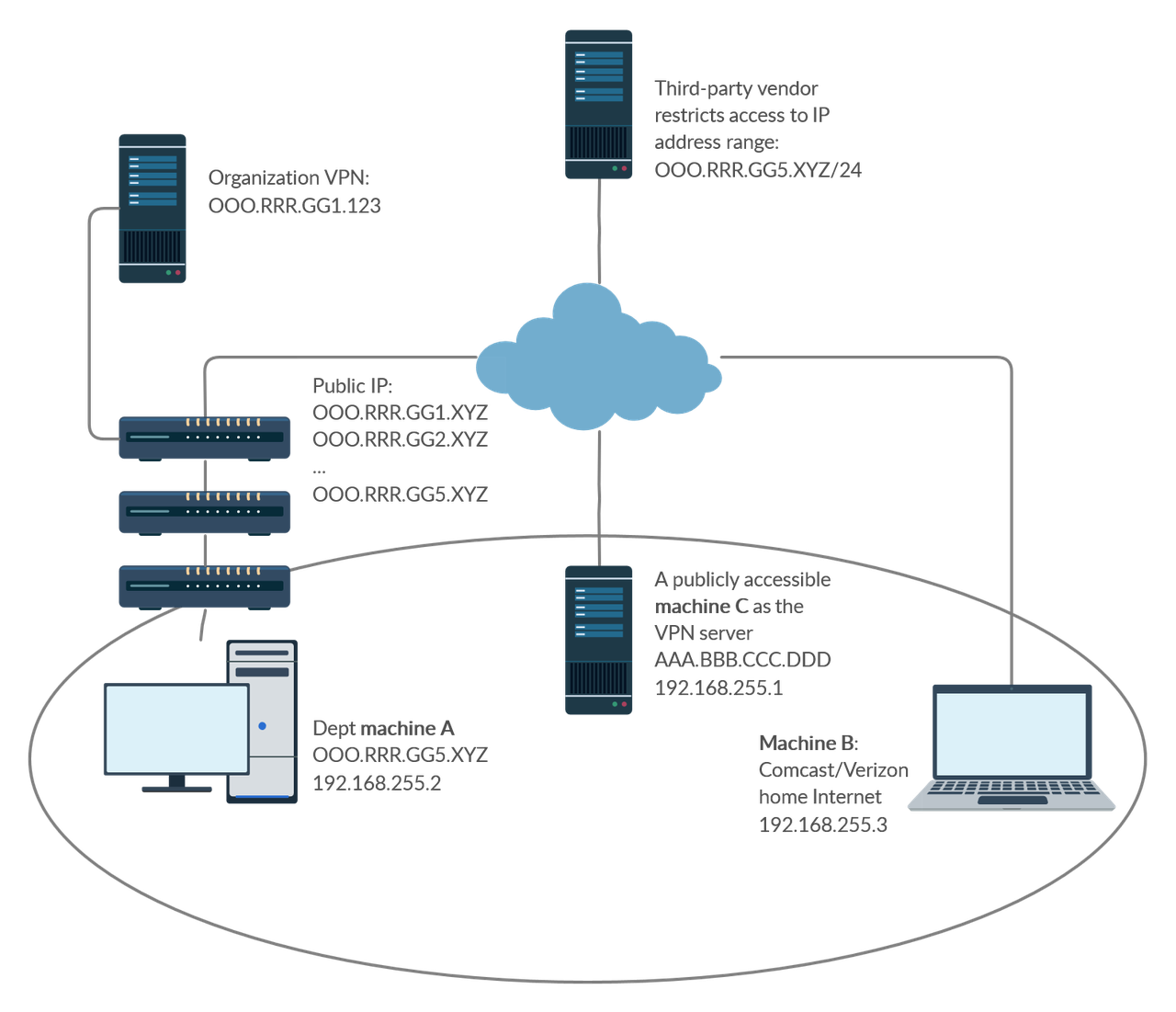
My use case: I want to route all Internet traffic from machine B through machine A. However, I cannot simply install OpenVPN server on machine A as machine A is behind layers of NATs/firewalls I don’t control. My current solution is to install OpenVPN server on machine C, and have both machines A and B connect to C as clients. I’m trying to set up proper routes so that all traffic from B can be routed through A. The setup on each machine and the steps I have attempted are detailed below and my remaining problem is in the second to last paragraph.
Now, machine C runs Linux and OpenVPN server in a Docker container (https://github.com/kylemanna/docker-openvpn). With redirect-gateway def1, both client machines can connect and route traffic through the server (https://ipleak.net confirms the server IP). For the following tests though, redirect-gateway def1 is removed, while topology subnet and client-to-client are added. The server has subnet IP 192.168.255.1 and public IP AAA.BBB.CCC.DDD.
machine A runs Windows and has IPEnabledRouter=1 set in HKLM\SYSTEM\CurrentControlSet\Services\Tcpip\Parameters\, Service Routing and Remote Access set to Automatic and running, and the network adapter with Internet access set to allow sharing from the OpenVPN TAP adapter. It is assigned 192.168.255.2.
machine B runs Windows and is behind a router with IP 192.168.1.100. It is assigned OpenVPN subnet IP 192.168.255.3. The following routes are added in addition to what OpenVPN sets up automatically:
Network Destination        Netmask          Gateway       Interface  Metric
          0.0.0.0        128.0.0.0    192.168.255.2    192.168.255.3    259
        128.0.0.0        128.0.0.0    192.168.255.2    192.168.255.3    259
  AAA.BBB.CCC.DDD  255.255.255.255      192.168.1.1    192.168.1.100    291
From machine B, I can ping machine A at 192.168.255.2, but Internet traffic is still routed through the OpenVPN server (ipleak shows AAA.BBB.CCC.DDD). I tried adding a route: route add default gw 192.168.255.2 tun0, but this makes the clients unable to access Internet. The server route table typically looks like:
Destination     Gateway         Genmask         Flags Metric Ref    Use Iface
0.0.0.0         172.19.0.1      0.0.0.0         UG    0      0        0 eth0
172.19.0.0      0.0.0.0         255.255.0.0     U     0      0        0 eth0
192.168.254.0   192.168.255.2   255.255.255.0   UG    0      0        0 tun0
192.168.255.0   0.0.0.0         255.255.255.0   U     0      0        0 tun0
How can I make this work?
[EDIT] A little more context on the use case: I need to set up VPN for a division so that their users’ home computers machine B can access third-party resources that restrict access based on IP address. The access to machine A is not blocked, but there are at least two layers of NAT/firewalls up the organization, whose admins do not want to change their setup to help with incoming connections. We therefore want to devise a working solution using `machine C** that may be a VPS as the VPN server. There is an official VPN service but since it is open to certain outside members, the third-party vendor does not wish to allow its IP access.
Solution In principle, the setup should be similar to RoutedLans, except that we cannot simply set machine A to handle 0.0.0.0. This SF answer explains why packets cannot be sent through another client as the gateway using the TUN interface. However, there is a workaround according to the first comment to this answer.
On machine C:
- Add the following to the server configuration:
topology subnet
client-to-client

route 1.0.0.0 255.0.0.0
route 2.0.0.0 254.0.0.0
route 4.0.0.0 252.0.0.0
route 8.0.0.0 248.0.0.0
route 16.0.0.0 240.0.0.0
route 32.0.0.0 224.0.0.0
route 64.0.0.0 192.0.0.0
route 128.0.0.0 128.0.0.0

push "route 1.0.0.0 255.0.0.0"
push "route 2.0.0.0 254.0.0.0"
push "route 4.0.0.0 252.0.0.0"
push "route 8.0.0.0 248.0.0.0"
push "route 16.0.0.0 240.0.0.0"
push "route 32.0.0.0 224.0.0.0"
push "route 64.0.0.0 192.0.0.0"
push "route 128.0.0.0 128.0.0.0"
- Set iroutes and a static IP for
machine Ainclient-config-dir.
ifconfig-push 192.168.255.2 255.255.255.0
push "route 192.168.255.0 255.255.255.0 192.168.255.1"

iroute 1.0.0.0 255.0.0.0
iroute 2.0.0.0 254.0.0.0
iroute 4.0.0.0 252.0.0.0
iroute 8.0.0.0 248.0.0.0
iroute 16.0.0.0 240.0.0.0
iroute 32.0.0.0 224.0.0.0
iroute 64.0.0.0 192.0.0.0
iroute 128.0.0.0 128.0.0.0
On machine A:
-
In
HKLM\SYSTEM\CurrentControlSet\Services\Tcpip\Parameters\, setIPEnableRouter=1. -
Set service
Routing and Remote AccesstoAutomaticand make sure it is running. -
Set the network adapter with Internet access to allow sharing from the OpenVPN TAP adapter. It appears that sharing has to be disabled and re-enabled every time the machine is rebooted.
On machine B: make sure redirect-gateway def1 is in the client configuration.
Comments
Comments powered by Disqus