Vinegar cleaning solved double clicking problems on several mice!
Problem: Many mice I have have developed the double clicking issue, including many models from Logitech, and others from Dell, Lenovo, and a few no-name brands. They were mostly with the left button: one click would register as two or holding the left button would release (registering a click) and immediately hold again. One Lenovo mouse had an issue with the right button not registering a click when you can hear a clear clicking sound.
Other problems solved by this trick:
-
A Conair hair dryer becomes very weak unless pressure is kept on the button.
-
A 1st gen Google Home Mini that started to repeatedly say “the mic is on” and “the mic is off” at times, as if the microphone switch is flipped on and off rapidly.
Solutions that don’t work: Overtime I have tried a great number of solutions from web articles and forum posts. I suspect they must have worked for some scenarios, and anything involving physically manipulating the mice (e.g., [1] & [2] below) may alleviate the symptoms initially, but none of these solutions addressed my problems for more than a few days.
- Cleaning debris: squeezing the buttons (perhaps while holding it upside down), shaking, and using compressed air to clean.
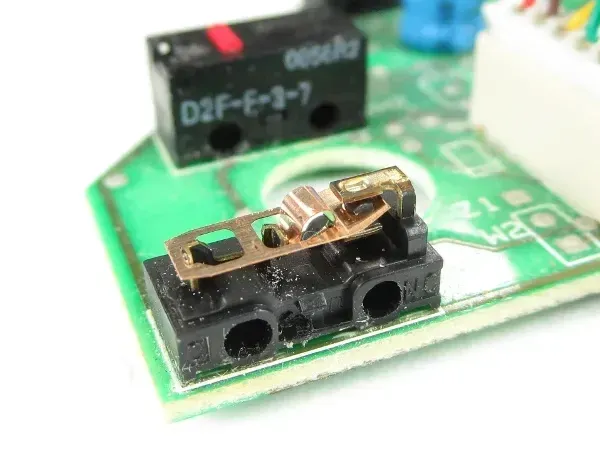
- Disassemble and bend the copper spring (image below taken from Tom’s Hardware). The idea is that the switch fails because of mechanical fatigue. However, many of my Logitech mice developed the double clicking issue in less than a year (and this solution didn’t work for more than a few days; also see below).
- Software solutions, e.g., using AutoHotKey to ignore rapid consecutive clicks, are very hard to tune the sensitivity threshold.
Solutions that did work: I don’t fully understand why, but [2] worked for my mice from all the different brands. The Logitech ones that failed in less than a year have worked fine for two or three years now (Corrosion developed quickly, but somehow the materials stabilized so a cleaning makes it last longer than new?)
- Soldering on a new switch. Did this once and it worked perfectly.
- Disassemble and carefully remove the switch housing to expose the copper innards (see the picture above). I found using a dulled X-Acto knife very effective in prying open the clips on the side of the switch base that hold the black plastic housing. Try not to dislodge the copper spring. They can be tricky to put back (which involves bending & twisting..) Use a Q-tip to clean the four copper contact surfaces (two on the spring, and the top and bottom surfaces on the base) with vinegar. Dry and reassemble everything.
- Some models like Microsoft Wireless Mouse 1000 use Panasonic EVQ-P0E07K / EVQ-P0D07K style micro switches. The switches can be pried open but have to be super-glued back.
Comments
Comments powered by Disqus